How to Match a Peptide Batch Number to a COA

Posted by Jeremy S. Strickland on 2026 Jun 26th

How to Match a Peptide Batch Number to a COA

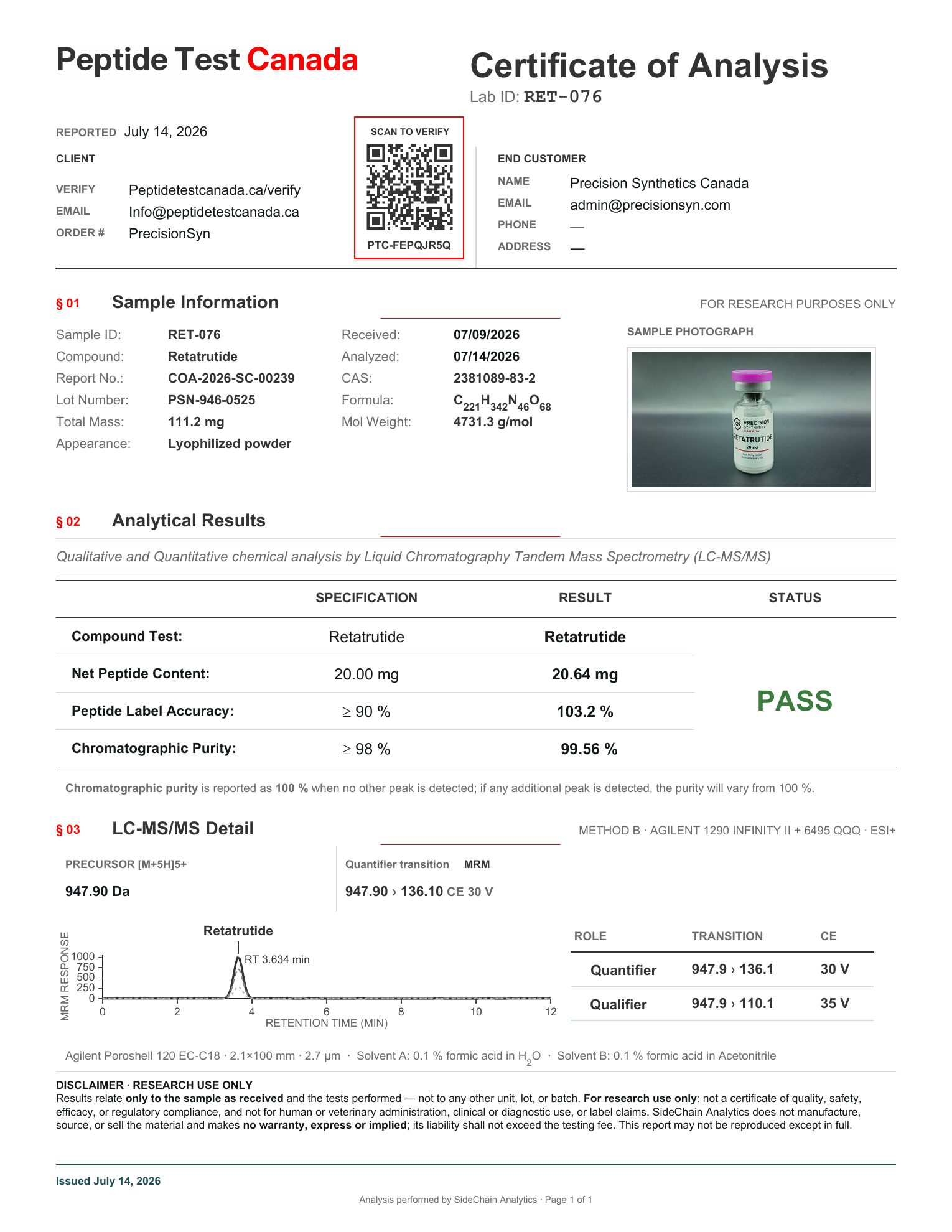
A certificate of analysis is only useful when it connects to the exact material being reviewed. For research-use peptides, that connection usually depends on a batch number, lot number, report number, task number, QR code, or lab verification record.

This matters for researchers, lab managers, procurement teams, and quality-focused buyers because a COA is not just a product description. It is a batch-specific quality document. A report that names the right compound but does not connect to the specific lot in hand should be considered incomplete evidence.

Precision Synthetics Canada supplies research use only materials. They are not for human or veterinary use. This article explains how to match a peptide batch number to a COA or third-party report during documentation review, without turning the COA into a broader claim than it supports.

What a Batch Number Does on a Peptide COA

A batch number is a traceability identifier. It links a specific production or packaging event to supporting records, which may include source-lab documentation, third-party test results, chromatograms, method summaries, and release information.

In practical terms, the batch number helps answer a narrow but important question:

Does this document appear to belong to the same material being reviewed?

For a peptide COA lookup, the batch or lot identifier should normally appear in more than one place. Depending on the supplier and lab workflow, it may appear on:

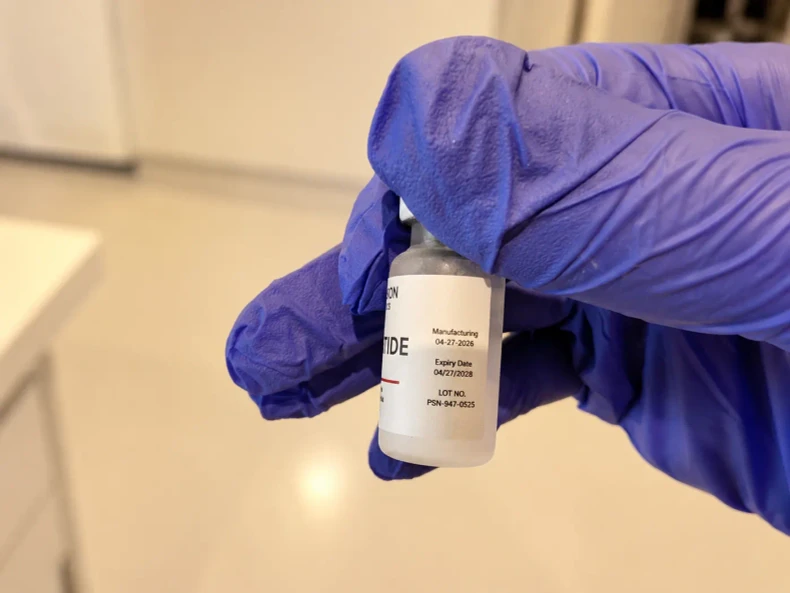
  • The vial or outer label.
  • The product page.
  • The supplier's COA library.
  • The COA PDF.
  • A third-party lab report.
  • A lab verification portal.
  • A QR code destination or verification key result.

A strong match does not require every document to use identical formatting, but the identifiers should be consistent enough to show a clear chain between the product, the batch, and the testing record.

For example, a label may show B24091, while the COA shows Batch: B24091 and the third-party report references the same identifier in a client sample field. That is a meaningful batch link. By contrast, a COA that lists only a compound name, with no batch or lot identifier, is much weaker for lot-specific review.

Batch Number vs Lot Number vs Report Number

Batch numbers, lot numbers, report numbers, and verification keys often appear together, but they do not mean the same thing. Confusing them can lead to false confidence in a document that does not actually match the material.

FieldWhat it usually identifiesWhere it may appearWhat to compare
Product nameThe named peptide or catalogue itemProduct label, product page, COA, lab reportConfirm the compound name is consistent across documents. Watch for spelling differences, salt form differences, or catalogue variants.
Batch or lot numberThe specific material lot being reviewedLabel, COA, supplier library, source-lab document, third-party reportThis is the main traceability field. It should connect the physical item or product page to the COA or report.
COA, report, or task numberThe document or lab work orderCOA header, lab report, verification portalThis helps identify the document, but it is not a substitute for a batch or lot match.
Verification key or QR codeA lookup route for confirming a lab recordLab report, QR code, portal resultUse it to check whether the hosted or portal record matches the report details.
Testing dateWhen the analysis was performed or reportedCOA, lab report, portal recordCheck whether the date is plausible for the batch and consistent with the rest of the record.

A report number proves that a report exists. A QR code may prove that a lab record can be opened. Neither automatically proves that the report belongs to the exact batch being reviewed. The batch or lot identifier is the key link.

A Step-by-Step COA Lookup Workflow

Use a structured workflow when reviewing peptide COAs, third-party reports, or vendor-hosted PDFs. The goal is not to find a reassuring document. The goal is to determine whether the document belongs to the exact material under review.

Start with the product label or product page. Record the product name, catalogue name, batch number, lot number, fill size, and any visible code or QR reference. If reviewing a product page before purchase, note the batch or lot shown there, if available.

Find the batch or lot identifier. Look for terms such as Batch, Lot, Batch No., Lot No., Sample ID, or Client Sample ID. Some lab reports may place the batch reference in a sample description field rather than in a dedicated batch field.

Open the matching COA. Use the supplier's COA library where available. PSC maintains a dedicated COA lookup library for batch-linked documentation review. The most useful COA result is one that clearly names both the product and the batch or lot identifier.

Compare product name, lot, test date, and report number. Do not stop at the first matching word. Compare the product name, batch or lot number, testing date, report date, report number, and any task number. Minor formatting differences may be acceptable, but unexplained identifier differences should be resolved before relying on the document.

Use the lab verification portal when available. If a third-party report includes an official verification link, QR code, verification key, or report lookup route, check it directly. A vendor-hosted PDF may be useful, but an official lab verification result provides a stronger check that the report exists in the lab's own system.

Check whether the document includes HPLC, LC-MS/mass spectrometry, LAL, or other relevant methods. Confirm which tests were actually performed for that batch. HPLC, LC-MS or mass spectrometry, and LAL endotoxin screening answer different questions. They should not be considered interchangeable. For a fuller explanation of method boundaries, see PSC's guide to HPLC, LC-MS, and LAL testing.

State the conclusion narrowly. A careful conclusion might be: "The COA and third-party report appear to match batch B24091, and the documents report HPLC and LC-MS results for that batch." Avoid expanding that into claims the documents do not support.

This workflow is especially useful when comparing source-lab documentation with independent third-party verification. Source-lab records may provide manufacturing or release documentation, while independent reports may provide separate analytical confirmation for a submitted sample. The strongest documentation set is one where the identifiers connect clearly across both.

What to Check on a Janoshik or Third-Party Verification Record

Third-party testing can add useful independent information, but only when the report is connected to the batch being reviewed. The same principle applies whether the report comes from Janoshik, Testide, another independent lab, or a source-lab documentation package.

When reviewing a Janoshik COA verification record or another third-party lab result, check:

  • The official lab lookup route, QR code, or verification key.
  • The report number or task number.
  • The product or sample name.
  • The batch, lot, sample ID, or client sample ID.
  • The date of analysis and report date.
  • The test method or methods listed.
  • The reported result and any method-specific notes.
  • Whether the portal result matches the PDF being shown by the vendor.

A vendor-hosted PDF should not be considered the final source of truth when an official lab verification route is available. Vendor-hosted documents can be convenient for browsing, archiving, and procurement review, but the official lab lookup can help confirm whether the report number, task number, or QR-linked record is recognized by the testing lab.

That said, a lab portal result also has limits. It may confirm that a report exists and that certain details match the report. It does not automatically explain the supplier's chain of custody, storage history, packaging controls, or every possible quality attribute. It should be interpreted as one part of a documentation package, not as a complete quality system by itself.

For PSC's broader approach to document access and transparency, see COA transparency. For help interpreting the fields inside a COA, use the full guide on how to read a COA.

Common Batch-Matching Red Flags

Batch matching is partly about finding matches, but it is also about knowing when not to rely on a document. The following issues should trigger caution during peptide lot number lookup or COA review.

Missing batch or lot number

A document that names only the compound may not be batch-specific. For procurement and lab review, the absence of a batch or lot identifier makes it difficult to connect the document to the material being assessed.

Label and COA mismatch

If the label shows one batch and the COA shows another, the mismatch should be resolved before the document is accepted. This can happen because of an old PDF, a page cache, a copied file, or a simple administrative error, but the cause still matters.

Recycled PDF

A recycled PDF is a document that appears to have been reused across multiple batches without clear batch-specific updating. Warning signs include old test dates, missing lot fields, generic file names, or a report that is linked from several product pages without a clear batch relationship.

Dead verification link

A broken lab verification link does not automatically prove that a report is invalid, but it weakens the review. Try the official lab lookup route, check the report or task number manually, and compare all visible identifiers.

No chromatogram or weak method detail

For HPLC-based purity review, the chromatogram and method detail can be important. For LC-MS or mass spectrometry, the reported mass information and method context matter. A document that gives only a headline number, without method support, should be interpreted cautiously.

Report names a compound but not a batch

A report may name the correct peptide but fail to identify the batch, lot, sample ID, or client sample ID. That kind of report may support a general claim that a sample with that name was tested, but it does not strongly support batch-specific traceability.

Product name variants are not explained

Peptide names can appear with abbreviations, catalogue names, salt-form details, or sequence-related descriptions. Some variation may be normal, but unexplained differences should be checked. The product being tested should be clearly the same research material being reviewed.

Date sequence does not make sense

A testing date that appears too old, too new, or inconsistent with the batch release timeline should be reviewed. Date mismatches can sometimes reflect retesting, amended reports, or document replacement, but they should be explained by the supplier's documentation.

What Batch Traceability Does Not Prove

Batch traceability is important, but it has limits. Matching a peptide batch number to a COA can support documentation review. It can show that a specific report appears to belong to a specific lot. It can also help researchers and procurement teams identify which tests were reported for that lot.

It does not prove:

  • Sterility.
  • Regulatory approval.
  • Suitability for human or veterinary use.
  • Suitability for any clinical purpose.
  • That every possible contaminant was tested.
  • That storage and handling were perfect after testing.
  • That one test method answers every quality question.
  • That a supplier's entire quality system has been audited.

Each method has boundaries. HPLC may support purity assessment under the reported conditions. LC-MS or mass spectrometry may support molecular identity review. LAL may support endotoxin screening where it is included in the batch documentation. None of these tests should be stretched beyond what the report actually says.

This is why PSC emphasizes batch-linked documentation, COA transparency, source-lab documentation, and independent third-party verification where available. The review should remain precise: identify the material, match the batch, confirm the document source, read the method, and state only what the record supports.

Conclusion

A peptide COA is most useful when it is tied to the exact batch or lot being reviewed. The core workflow is straightforward: start with the label or product page, identify the batch or lot number, open the matching COA, compare the report details, use the lab verification portal when available, and interpret the methods narrowly.

For current batch-linked documentation, use PSC's COA library. For a broader explanation of COA fields, test methods, and interpretation limits, see how to read a COA. Buyers reviewing category-specific research documentation can also consult PSC's pages for tirzepatide research-buyer documentation and retatrutide research-buyer documentation where relevant.

FAQ

What is a peptide COA?

A peptide COA, or certificate of analysis, is a quality document that reports information about a specific peptide batch or lot. It may include fields such as product name, batch number, testing date, purity result, identity testing, and other method-specific results where available.

Where should the batch number appear on a peptide COA?

The batch number should appear in a clear field such as Batch, Lot, Batch No., Lot No., Sample ID, or Client Sample ID. Ideally, the same identifier should also connect to the product label, product page, supplier COA library, and any third-party lab report.

Is a report number the same as a batch number?

No. A report number identifies a document or lab work order. A batch number identifies the specific material lot being reviewed. A useful documentation review should connect both: the report should exist, and it should clearly reference the correct batch or lot.

How do I verify a Janoshik COA or third-party peptide report?

Use the official lab verification route when available, such as a QR code, verification key, task number, or report lookup portal. Compare the portal result with the vendor-hosted PDF, including the product name, report number, sample identifier, batch or lot reference, testing date, and methods reported.

Should I rely on a vendor-hosted COA PDF?

A vendor-hosted PDF can be useful for review, but it should be compared against the batch or lot identifier and, where available, the official third-party lab verification record. The strongest match is one where the label, COA, and lab portal all point to the same batch-specific documentation.

What does it mean if the COA names the peptide but does not list a lot number?

A COA that names the peptide but does not identify a batch, lot, or sample identifier is weak for batch-specific traceability. It may show that a similarly named sample was tested, but it does not strongly connect the report to the exact material being reviewed.

What tests should I look for on a peptide COA?

Common documentation may include HPLC, LC-MS or mass spectrometry, LAL endotoxin screening, or other methods depending on the batch. These methods answer different questions, so they should be interpreted according to what the report actually states.

Does a batch-matched COA prove the material is suitable for human or veterinary use?

No. Batch matching supports research documentation review only. PSC materials are research use only and are not for human or veterinary use. A COA match should not be interpreted as regulatory approval, clinical suitability, sterility, or a complete contaminant assessment.


Research-use notice: Products and documentation referenced by Precision Synthetics Canada are provided strictly for lawful, non-clinical laboratory research purposes only. COAs and testing records are not medical documents, safety guarantees, sterility guarantees, therapeutic endorsements, dosing guidance, or approval for human or animal use.